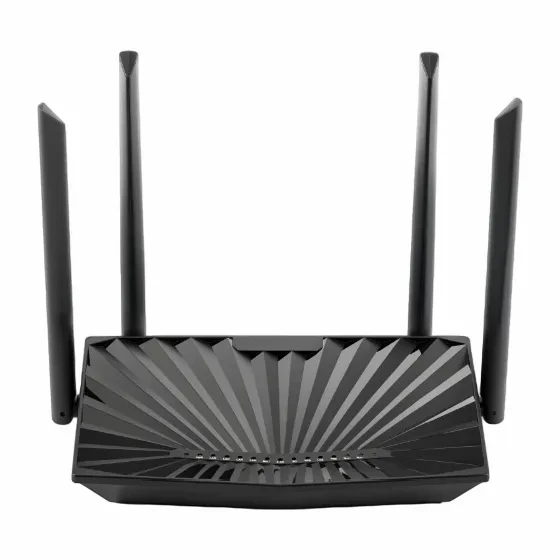
4GE LAN+1POTS+WiFi 6 GPON ONT
● AX3000 Wi-Fi 6 Technology ● Support Easy Remote Management ● Support VoIP and USB Ports ● Fast and Smooth Transmission
Product Overview
● AX3000 Wi-Fi 6 Technology ● Support Easy Remote Management ● Support VoIP and USB Ports ● Fast and Smooth Transmission
Request a QuoteProduct Details
1. AX3000 Wi-Fi 6 Technology
The AX3000 802.11ax modem router is built on Wi-Fi 6 (802.11ax) standard, offering superior speed, capacity, and efficiency. It is designed to handle the increasing demands of modern smart homes and offices, providing a faster and more reliable wireless experience for every connected device.
2. Support Easy Remote Management
The OMCI (ONT Management Control Interface) and TR-069 remote management, enables operators to remotely configure and manage GPON ONT devices.
3. Support VoIP and USB Ports
This 802.11ax modem router provides voice over IP technology with advanced communication features, and is compatible with industry-wide phone services, you can make and receive calls reliably. The GPON router lets you connect a USB storage device and instantly share documents, movies, pictures and music.
4. Smooth Transmission
The ONT has built-in dual active firewalls (SPI and NAT) to help protect your local network from intrusions. It is also equipped with WPA3 wireless encryption technology and access control to help protect your network from unauthorized access and outside treats so you can use the internet with confidence.
Parameter
Description | Wi-Fi6 GPON Modem Router |
Wireless Speed | 2.4GHz 600Mbps 5.8GHz 2402Mbps |
Standard | 802.11a/b/g/n/ac/ax |
Frequency | 2.4GHz & 5.8GHz |
Transmission Power (Max) | 2.4GHz: 22dbm 5.8GHz: 20dbm |
Interface | 1*GPON+1*GE ETH WAN+4*GE LAN+1*VOIP+1*USB |
Antenna | 4*5dbi fixed |
WAN Mode | DHCP/Static/PPPOE |
Easy MESH | yes |
TR069 | yes |
IPV4/IPV6 | yes |
Advanced Functions | 802.1Q VLAN/DHCP options (43/60/121) Bandwidth Control /Access Control/Port Forwarding/DDNS/DMZ/Parent Control /Black List/MAC Filter/IP filter/URL Filter/QOS/Anti-DOS attack |
Interface | 1*GPON WAN port (SC/APC type) |
Buttons | Power ON/OFF LAN |
LEDs | Power, PON, ALM, Internet, LAN, WLAN, Phone, WPS, USB |
Antenna | 4*5dbi external antennas |
GPON Features | ITU-T G.984.x compliant Upstream:1.25Gbps, Downstream:2.5Gbps |
Wi-Fi | Frequency: 2.4 GHz, 5GHz |
VOIP | SIP (RFC3261/3262/3264). |
Networking | PPPOE/Bridge/DHCP/Static IP WAN Mode |
QoS | Flexible packet classification |
Security | Stateful Packet Inspection (SPI) |
Management | Web based GUI |
Physical Characteristics | Net weight: 436g |
Power | Input: 100 ~ 240 V |
Environmental | Operating temperature: 0 ° C~ 40° C (32° F ~ 104° F) |
FAQ
Q: What should I do if I cannot log into the router's web UI?
Answer: Try the following solutions and log in again:
-Make sure your Ethernet cable with an internet connection is plugged into the WAN port of the router, not the LAN port.
-Make sure your wireless device is connected to the router's SSID.
-Ensure that your wired devices are properly connected to the router's ports 1, 2, or 3/IPTV via Ethernet cables. Also, make sure the devices are set to automatically obtain an IP address and automatically obtain DNS server addresses.
-Change the web browser and then log in again.
-Reset the router and log in again.
Q: I can't access the internet after configuration, what should I do?
Answer: Log in to the router's web UI and check the router's connection status on the status page .
-If your router has successfully connected to the internet, please try connecting your wireless device to the router's Wi-Fi network. Use the new Wi-Fi name and password. If a connection failure occurs on the page:
-Click on the WAN settings in the web UI to check if the connection type and parameters you entered are correct. And connect the Ethernet cable with internet connectivity directly to your computer.
-If your computer cannot access the internet, please consult your ISP. Otherwise, please reconnect the Ethernet cable with an internet connection. Go to the router, reset it, and reconfigure it.
Downloads
Product Datasheet
PDFTechnical Specifications
PDFInstallation Guide
PDFCE Certificate
PDFReady to Get Started?
Contact our sales team for pricing, availability, and customization options
Contact Us